Human Resource Information System

9
  • Establishment Module
  • Recruitment Module
  • Employee Module
  • Department Module
  • Schedule Module
  • Attendance Module
  • Disciplinary Module
  • Leaves Module
  • Holidays Module

Appointments Information System

1
  • Sessions Module

ERPat Dashboard

1
  • Dashboard

Internal Staff Modules

7
  • Employee Profile
  • Timeline Module
  • Advisories Module
  • Events Module
  • To Do Module
  • Notes Module
  • Messages Module

Learnings Information System

3
  • Courses Module
  • Certifications Module
  • Skillsets Module

Production Information System

3
  • Manufacturing Order Module
  • Bill of Materials Module
  • Units Module

Distributions Information System

2
  • Warehouse Module
  • Pallets Module

Finance Information System

6
  • Accounts Module
  • Vouchers Module
  • Journals Module
  • Payments Module
  • Expenses Module
  • Banks Module

Logistics Information System

4
  • Delivery Module
  • Transfer Module
  • Vehicles Module
  • Drivers Module

Sales Information System

7
  • Invoices Module
  • Estimates Module
  • Items Module
  • Brands Module
  • Clients Module
  • Customers Module
  • Stores Module

Procurement Information System

3
  • Purchases Module
  • Returns Module
  • Vendors Module

Safekeep Information System

1
  • Assets Module

Marketing Information System

5
  • Leads Module
  • Campaigns Module
  • Forms Module
  • Raffle Draw Module
  • Event Pass Module

Help Center Information System

4
  • Tickets Module
  • Internal Wiki Module
  • Knowledge Base Module
  • Pages Module

Planning Information System

4
  • All Projects Module
  • View Gantts Module
  • My Tasks Module
  • Timesheets Module

Security Information System

5
  • Kiosk Module
  • Offsite Access Module
  • Device Management Module
  • Locked Accounts Module
  • Access Logs Module

Reports Information System

5
  • Attendance Module
  • BIR Compliance
  • Financial Analysis Module
  • Sales Summary Module
  • System Logs Module

Settings Information System

8
  • System Settings
  • Components Settings
  • Customization Settings
  • Security Settings
  • Client Settings
  • Customer Settings
  • Vendor Settings
  • Setup Settings

Compensation

6
  • Payrolls Module
  • Commissions Module
  • Earnings & Deductions Module
  • De Minimis Benefits Module
  • Salary History Module
  • Loans Module
  • Home
  • Docs
  • Human Resource Information System
  • Establishment Module
View Categories

Establishment Module

1 min read

Overview #

The Establishment Module is used to manage and maintain records of company establishments, branches, sites, or work locations. These establishments serve as reference points for employee assignments, attendance tracking, scheduling, and other HR-related processes.

Each establishment record contains essential location and administrative details, ensuring consistent data usage across HR and related modules.

Key Features #

  • Centralized management of company establishments
  • Assignment tracking (number of employees per establishment)
  • Location-based information storage
  • Integration with Employee, Schedule, and Attendance modules
  • Secure role-based access

Accessing the Establishment Module #

  • Log in to the ERPat System.
  • Navigate to Human Resource from the main sidebar.
  • Select Establishment.

You will be directed to the Establishment listing page displaying all existing records.

Establishment Listing Page #

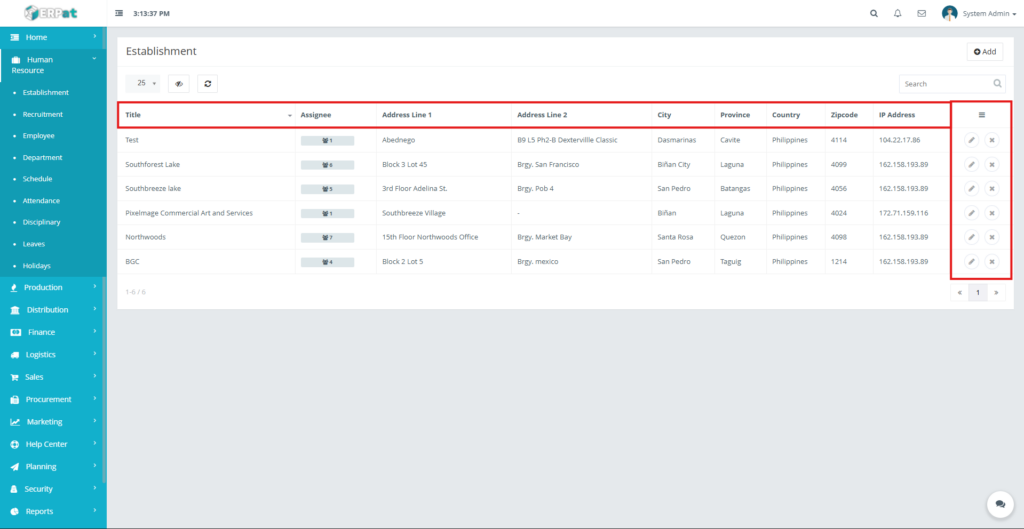
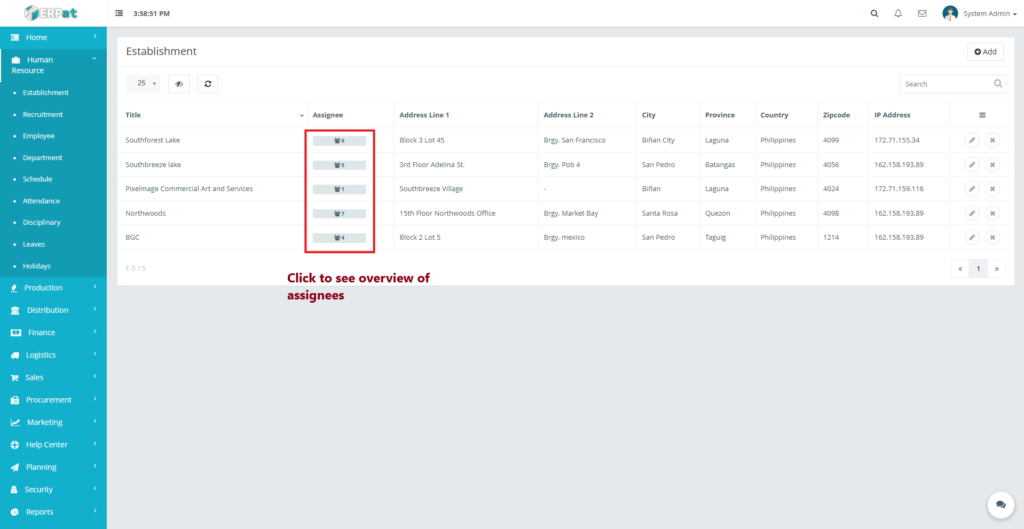
The listing page provides an overview of all establishments with the following information:

  • Title – Name of the establishment or site
  • Assignee – Number of employees assigned
  • Address Line 1 & 2 – Location details
  • City
  • Province
  • Country
  • Zipcode
  • IP Address – Registered IP (if applicable)
  • Actions – Edit or Delete controls

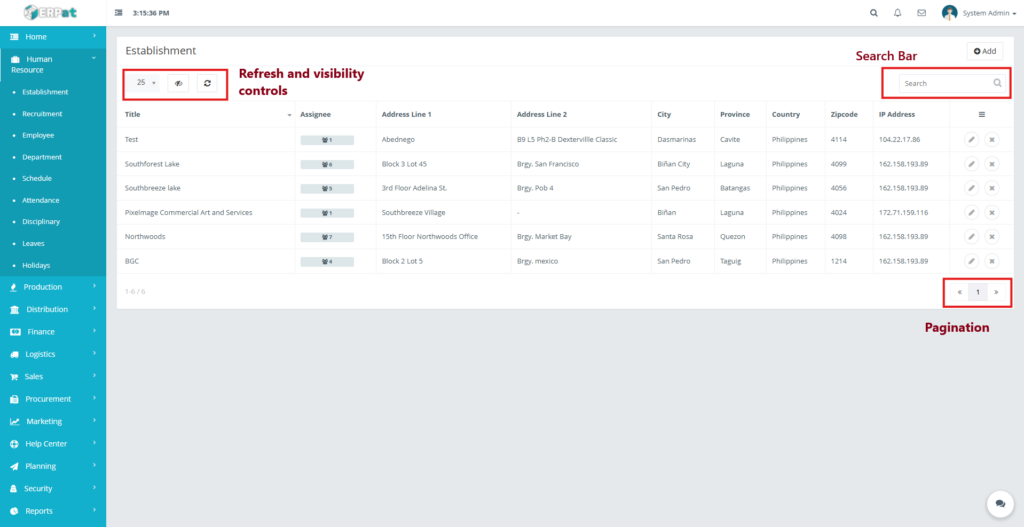
Additional controls:

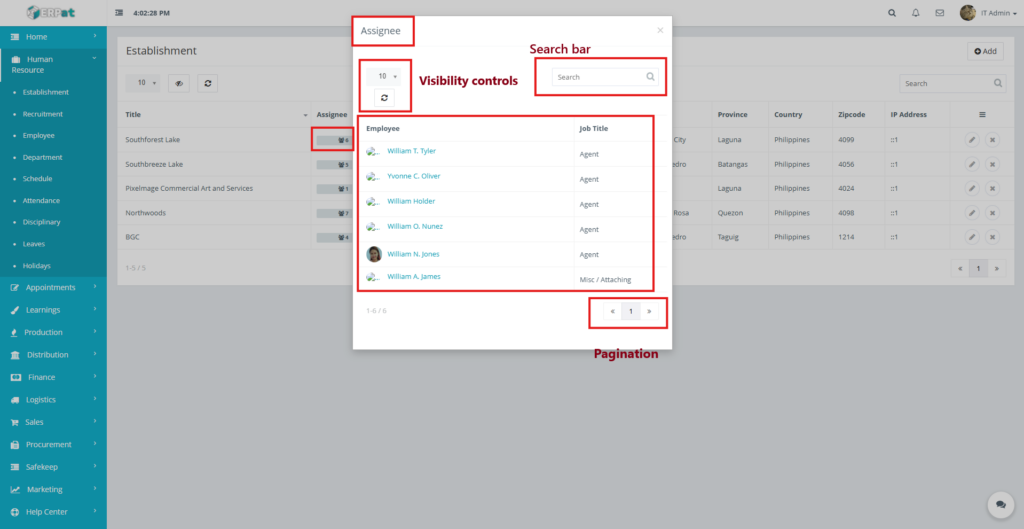
  • Search bar for quick lookup
  • Pagination for large datasets
  • Refresh and visibility controls

Steps for Adding a New Establishment #

STEPS #

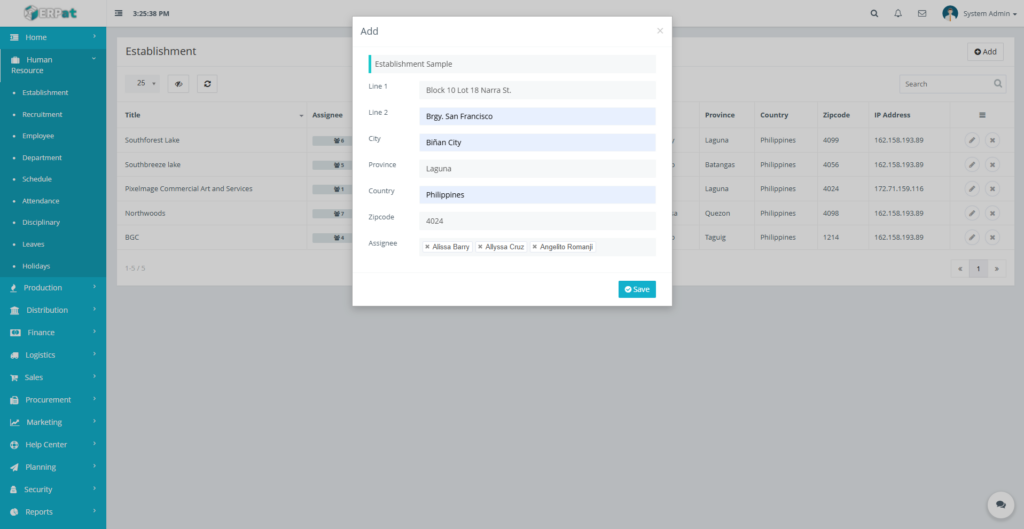
  1. Click the Add button located at the top-right of the page.
  2. Fill in the required fields:
    • Title
    • Address Line 1
    • Address Line 2 (optional)
    • City
    • Province
    • Country
    • Zipcode
    • Assignee/s
  3. Review the information for accuracy.
  4. Click Save to create the establishment.
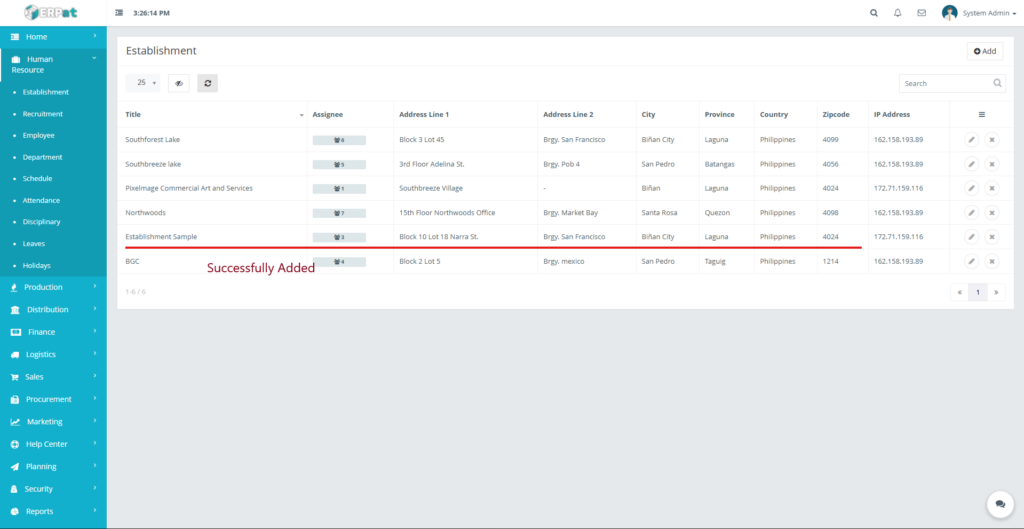
Result #

The newly added establishment will appear in the listing and become available for employee assignment.
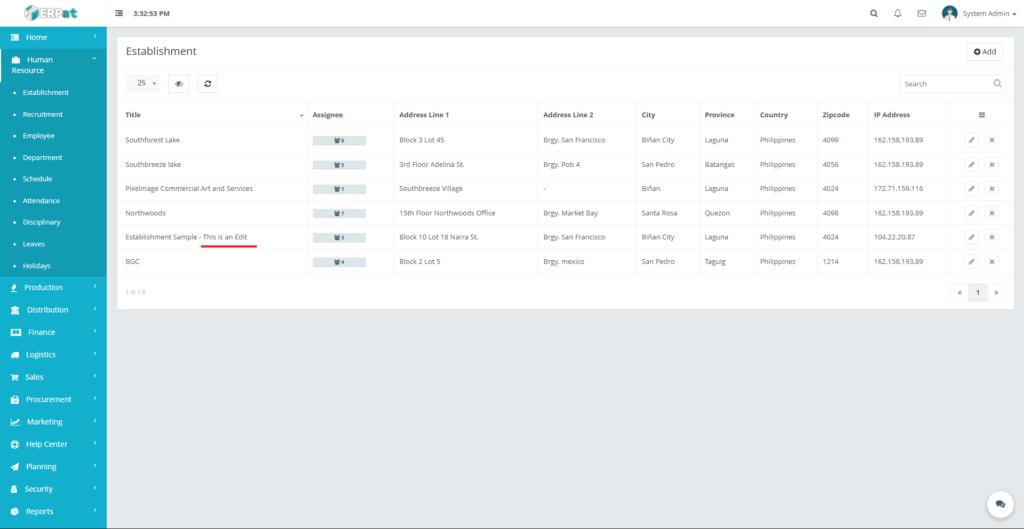
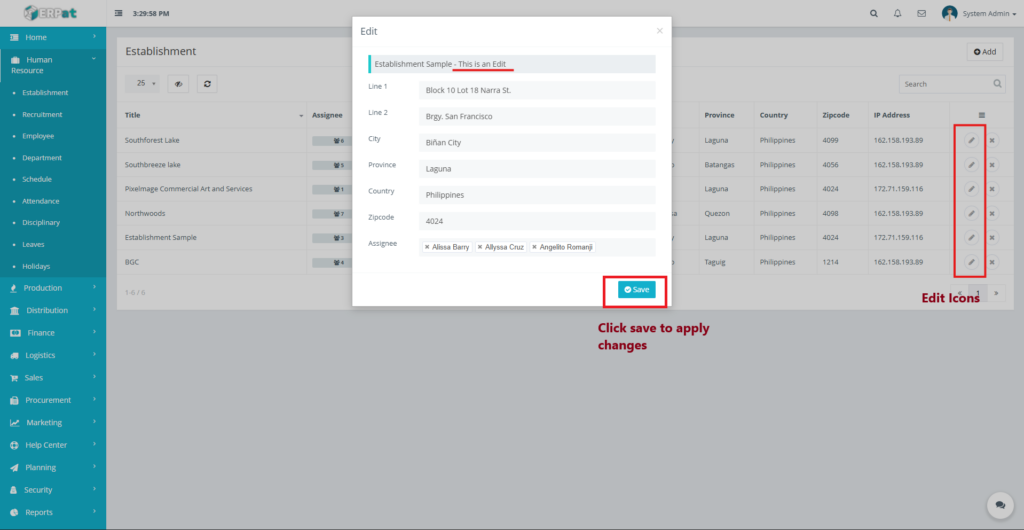
Steps for Editing an Establishment #

STEPS #

  1. Locate the establishment from the listing.
  2. Click the Edit (✎) icon under the Actions column.
  3. Update the necessary fields.
  4. Click Save to apply changes.

Notes: #

  • Changes will reflect across all linked HR modules.
  • Existing employee assignments remain intact unless removed.
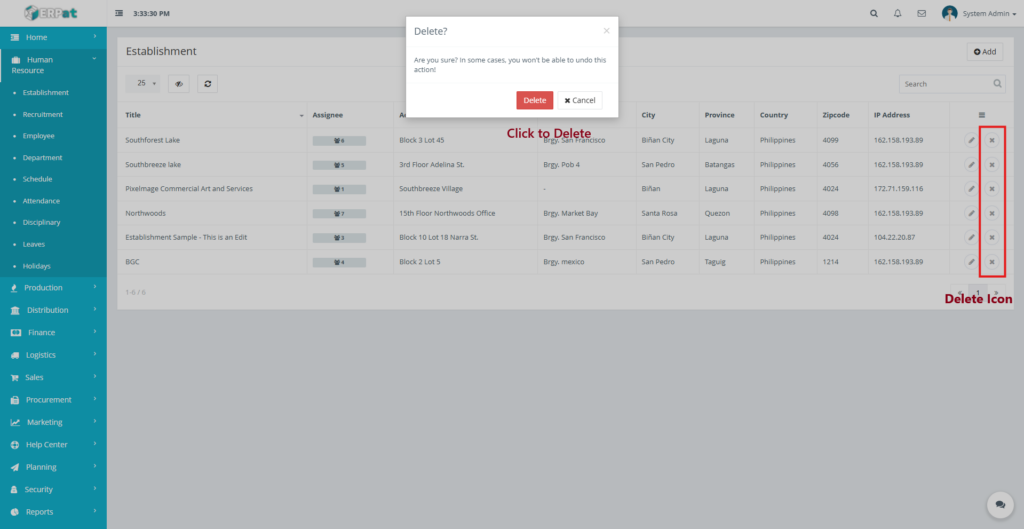
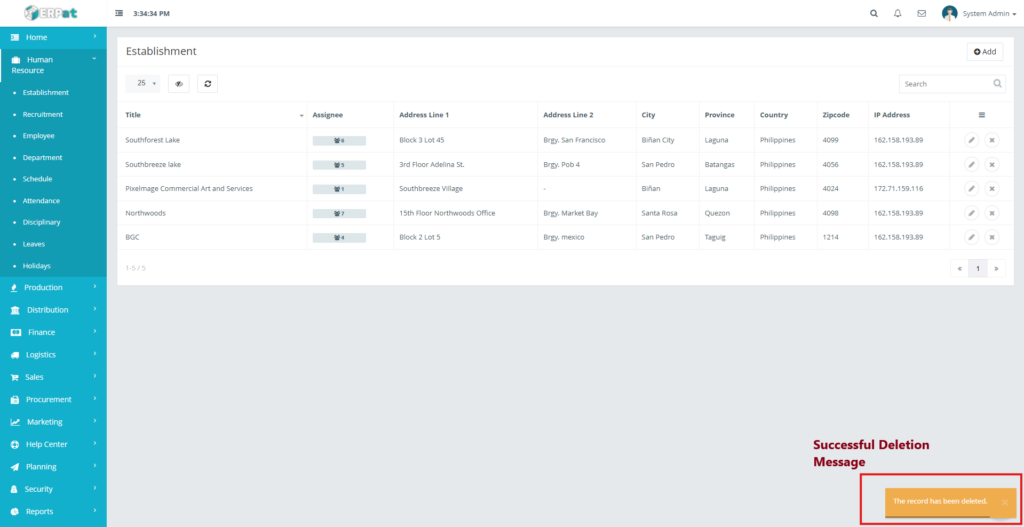
Steps to Delete an Establishment #

STEPS #

  1. Locate the establishment to be removed.
  2. Click the Delete (✖) icon under the Actions column.
  3. Confirm the deletion when prompted.

Assignee Indicator #

  • Displays the total number of employees linked to an establishment when clicked.
  • Used for workforce distribution and capacity monitoring.
Search and Filtering #

  • Use the Search field to find establishments by name, city, or province.
  • Pagination controls help navigate through multiple records efficiently.

Permissions and Access Control #

  • Only authorized HR or Admin roles can add, edit, or delete establishments.
  • View-only access may be granted to supervisory roles.

Best Practices #

  • Use standardized naming conventions for establishments.
  • Ensure address details are accurate for reporting and compliance.
  • Avoid deleting establishments that are still in active use.

Audit & Logs #

All create, update, and delete actions for establishments are logged for audit and compliance purposes within the ERPat System.

Last Updated: [December 18, 2025] Module Owner: Human Resource IS – ERPat System

What are your Feelings

Share This Article :

  • Facebook
  • X
  • LinkedIn
  • Pinterest
Still stuck? How can we help?

How can we help?

Updated on December 18, 2025
Recruitment Module

Leave A Comment Cancel reply

Table of Contents
  • Overview
  • Key Features
  • Accessing the Establishment Module
  • Establishment Listing Page
  • Steps for Adding a New Establishment
    • STEPS
  • Result
  • Steps for Editing an Establishment
    • STEPS
    • Notes:
  • Steps to Delete an Establishment
    • STEPS
  • Assignee Indicator
  • Search and Filtering
  • Permissions and Access Control
  • Best Practices
  • Audit & Logs
We use cookies to ensure that we give you the best experience on our website. If you continue to use this site we will assume that you are happy with it.